Point, click andlet AI code.
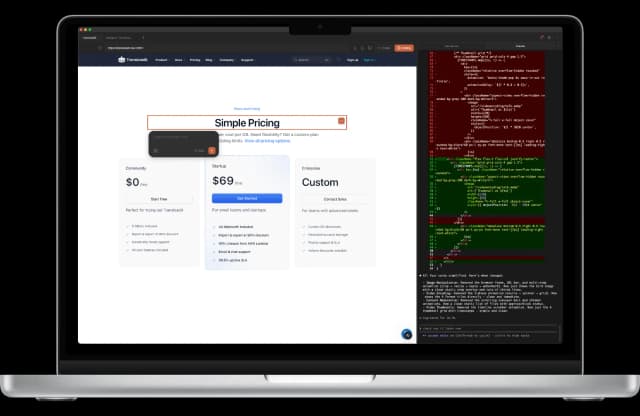
A free app that puts your browser, editor, and AI in one window. No more pasting screenshots to explain which button you mean — click it, and Claude or Codex writes the code.
v2.1.0 | macOS 13+ / Windows 10+
Been using this since yesterday. This is phenomenal. Thank you.
This tool is exceptional and super precise at what it does. It deserves way more recognition.
Select
Click it, don’t describe it
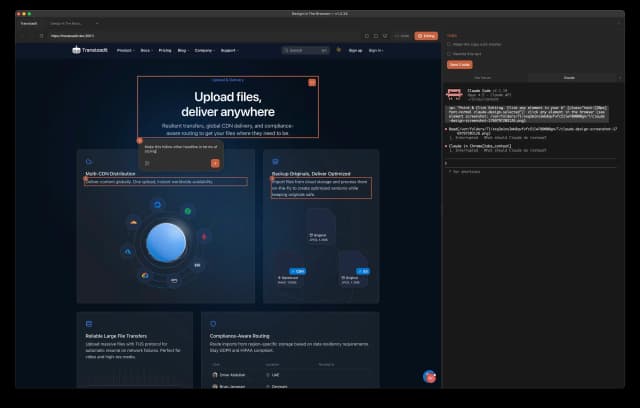
No more paragraphs explaining which button you mean. Click it, and AI gets the exact element — source file, line number and all.
Point & Click
Click any element to tell AI what to change. No screenshots needed.
Area Select
Drag a box around any area to give AI the visual context it needs.
Multi-Edit
Select multiple elements, queue up changes, send them all at once.
Reference Images
Drop in one or more screenshots and AI matches them. Drag an image into the terminal and it attaches as a real image, not a file path.
Build
Everything in one window
Browser, code editor, terminal and DevTools live side by side. No more juggling four apps to change one padding value.
Built-in Code Editor
Click any element and its source opens on the exact line. CMD+P to jump to any file, CMD+S to save and hot-reload.
Smart Source Matching
Component names, attributes, headings, text, and the URL are cross-checked to find the right file — with a picker for the close calls.
Integrated Terminal
Browser and terminal in one window, with a tab for every project. No more tab-switching.
Chrome Web Inspector
Full Chrome DevTools docked inside the app. Inspect the DOM, debug JavaScript, and check the network tab without leaving the window.
Ship
Stay on brand, ship faster
Measure what you built, check every viewport, and keep AI inside your design system — without copy-pasting a single value.
Design Tokens
Type > to search your Tailwind tokens with colour swatches, or @ to mention project files. AI writes the token, not a hardcoded hex.
CSS Inspector
Hold ALT to inspect classes, computed styles, and colours. Click to copy values, toggle hex/rgb/hsl.
Grids & Guides
Cycle spatial and baseline grids with SHIFT+G, hold G for crosshair guides, press F to freeze animations mid-motion.
Responsive Testing
Switch between desktop, tablet, and mobile viewports instantly.
Made in the open
Dosmos is free and open source. No account, no subscription — download it and start building.
Star it on GitHubFAQ
Questions, answered
- What is Dosmos?
- Dosmos is a free, open-source desktop app that puts a browser, a code editor, a terminal, and Chrome DevTools in one window. You click an element on your running site and your AI coding agent receives the exact source file and line number to change, so you never have to describe or screenshot the element you mean.
- Which AI coding agents does Dosmos work with?
- Dosmos runs on top of the command-line coding agent you already use: Claude Code, Cursor, Codex, Antigravity, or Qwen. It does not ship its own model and does not require a separate AI subscription of its own.
- How much does Dosmos cost?
- Dosmos is free and open source. There is no account, no subscription, and no paid tier — you download it and start building. You continue to pay only for whichever AI coding agent you already use.
- Which operating systems does Dosmos support?
- Dosmos runs on macOS 13 or newer, with separate builds for Apple Silicon and Intel Macs, and on Windows 10 or newer.
- How is Dosmos different from browser DevTools?
- Browser DevTools edits styles in the page only, so the change disappears on refresh. Dosmos maps the element you clicked back to its source file and line, so your AI agent edits the real code in your project and the change persists.
- Do I need to know how to code to use Dosmos?
- No. The Dosmos setup guide walks you from a brand-new Mac or Windows PC to a running project in plain English, covering how to install Node.js, install a coding agent, and open your first project.
- Does Dosmos send my code anywhere?
- No. Your code, your projects, and your API keys stay on your device. Product analytics are opt-in, auto-updates only check for new releases, and Dosmos has no accounts and no payments.

Try it. It's free.
No account needed. Download and start building in minutes.
Requires Claude Code, Cursor, Codex, Antigravity, or Qwen CLI